Evidence / Grounding (What Was Used)
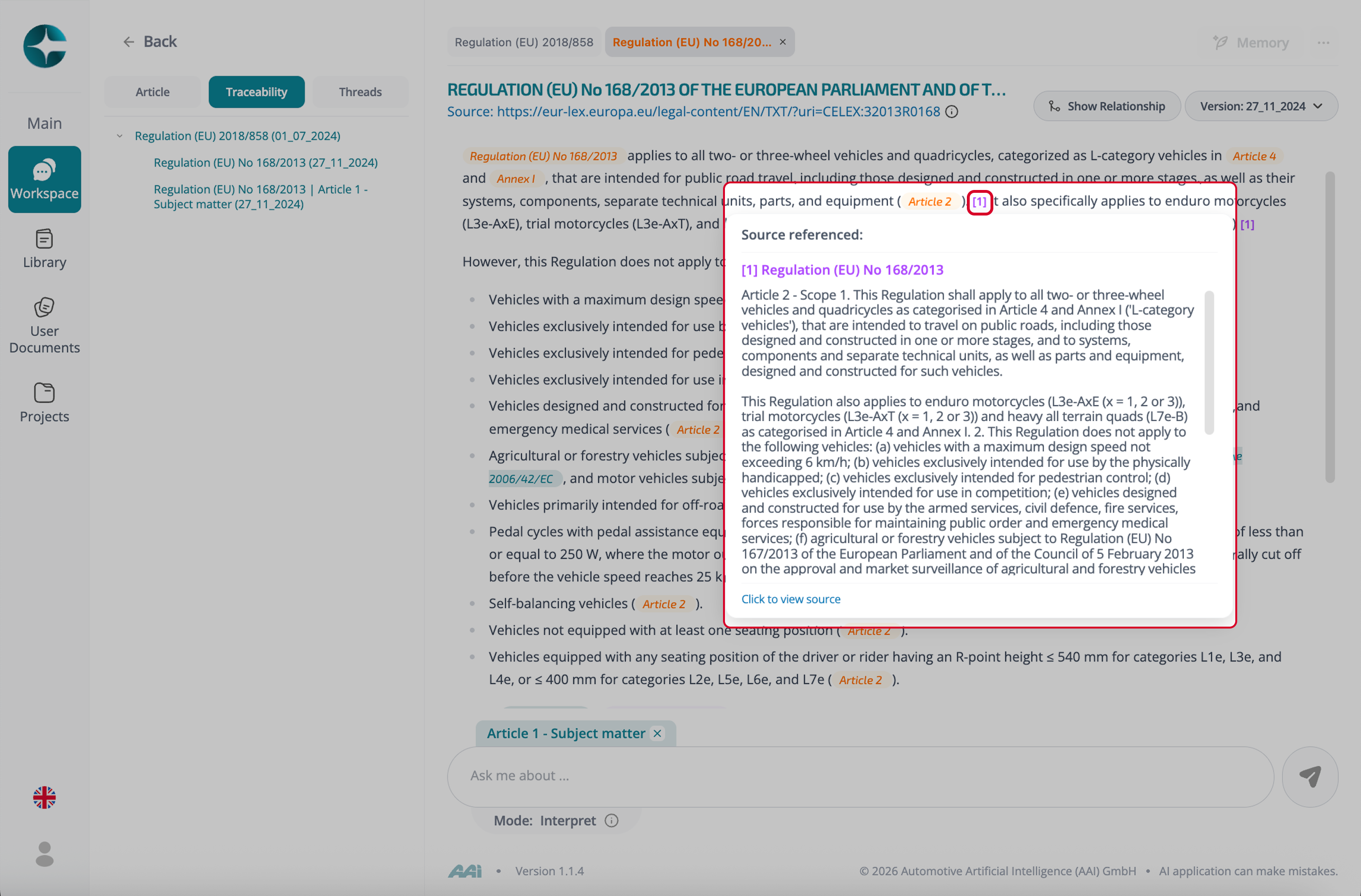
Grounding shows the exact source passages CORA relied on to generate an answer.
It is the evidence layer that allows you to verify wording, intent, and scope directly against the source text.
Grounding is surfaced inline and can also be reviewed in a dedicated panel.
How to view grounding
You can access grounding in two ways:
-
From the Grounding / Evidence panel
-
Open the Grounding (or Evidence) panel in a thread
-
Review the list of source passages used
-
From inline evidence markers
-
Hover over or select evidence markers shown at the end of paragraphs or sentences
- Inspect which exact text segments support that part of the answer
From either entry point, you can open a passage to see it in full document context.
Open all sources
Many CORA environments also provide an option at the end of a response to open all referenced sources / grounding passages at once.
Use this when you want to:
- Validate the entire answer quickly
- Review all supporting evidence before creating notes or requirements
- Prepare for review or handover
Note
Grounding is not additional explanation—it is the verifiable evidence behind the answer.
Use it whenever accuracy, versioning, or compliance decisions matter.